
How to remove a popup
No longer need a popup on your page? Here is how to remove it.
Remove a popup from a page
- Open your page and click Edit page.
- Click Popups at the top left. Your popups show under Page pop-ups.
- Click the trash icon next to the popup. It is removed straight away, without a confirmation.
- Click Save.
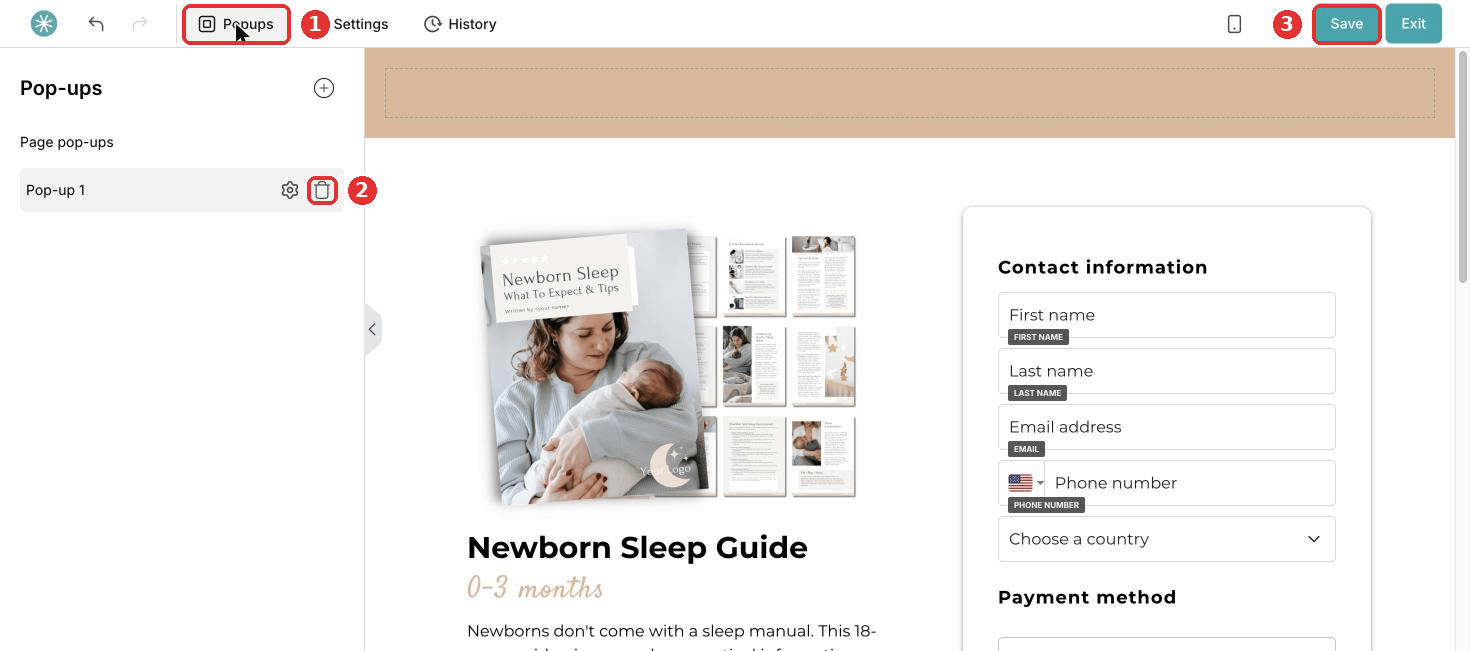
Removed the wrong popup? Click Exit and leave without saving. The popup comes back. Once you save, it cannot be restored.
Check your buttons and text links. One which opened the removed popup now does nothing. Give it a new action, or remove it.
Stop a popup from opening by itself
Want to keep the popup, but stop it from opening automatically?
- Click Popups and click the popup to open it.
- Click Edit popup settings above the popup and untick the option to open it automatically.
- Save the page.
Remove a popup form step
A popup form you created as a funnel step, for example for your blog or external website:
- Open your funnel.
- Click the three dots next to the popup form step and choose Remove.
- Click Confirm.
Added the popup to an external website with a script? Remove the script from your website too.
Did this answer your question?